DataTrolley FREE AI-Powered

Break free from vendor lock-in. Migrate your CRM, PSA, or RMM data to a new platform with the power of AI-assisted intelligent field mapping.

Download for Windows

Version 1.0 | Windows 10/11 | ~25 MB

ConnectWise
Autotask
Tigerpaw
SalesForce
SQL Server
MySQL
PostgreSQL

AI-Powered Database Migration Made Easy

Intelligent field mapping and conversational migration planning in one powerful tool
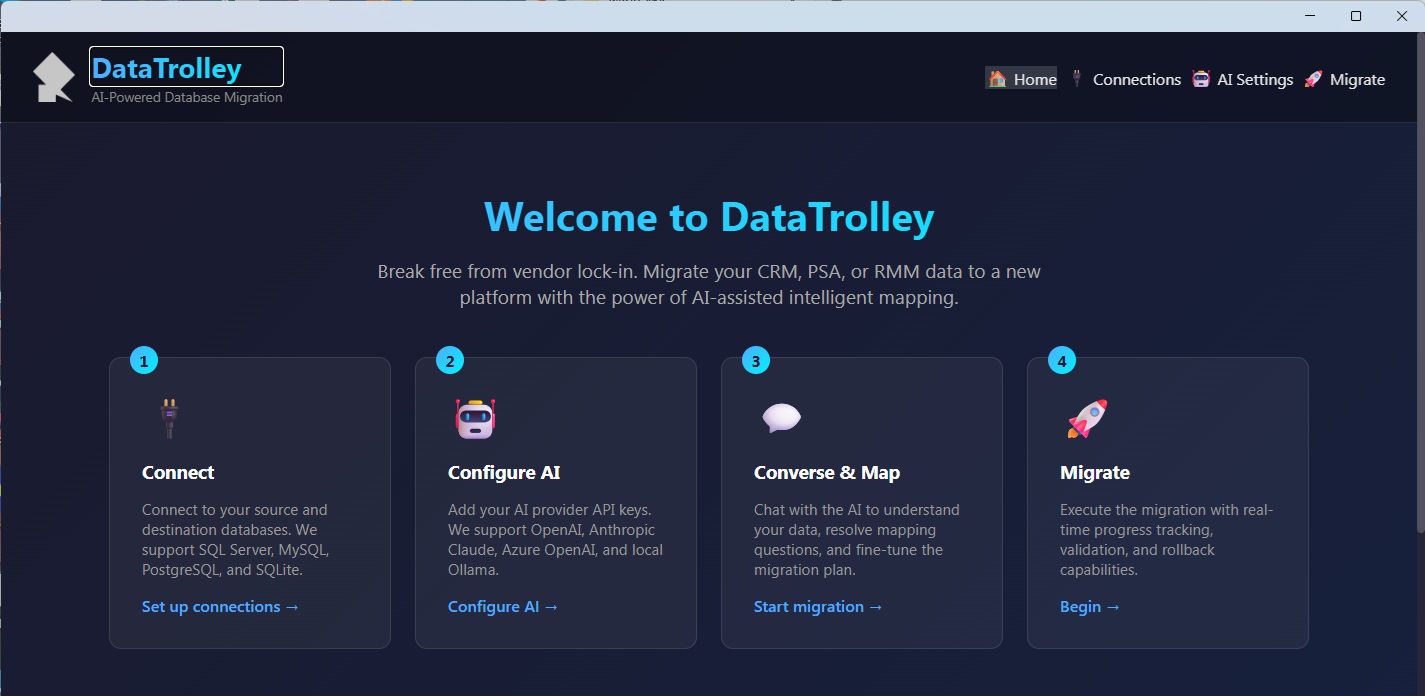
DataTrolley AI-Powered Data Migration Tool - CRM PSA RMM migration with intelligent field mapping

Simple 4-Step Migration Process

DataTrolley guides you through the entire migration with AI assistance

1

Connect

Connect to your source and destination databases. We support SQL Server, MySQL, PostgreSQL, and SQLite.

2

Configure AI

Add your AI provider API keys. We support OpenAI, Anthropic Claude, Azure OpenAI, and local Ollama models.

3

Converse & Map

Chat with the AI to understand your data, resolve mapping questions, and fine-tune the migration plan.

4

Migrate

Execute the migration with real-time progress tracking, validation, and rollback capabilities.

Powerful Features for Complex Migrations

Everything you need to safely migrate your business data

🤖

AI-Assisted Field Mapping

The AI analyzes your source and destination schemas, automatically suggesting field mappings and transformations based on data types and naming conventions.

đŸ’Ŧ

Conversational Planning

Chat with the AI to resolve complex mapping decisions. Ask questions about your data structure and get intelligent recommendations.

🔗

Multi-Database Support

Connect to SQL Server, MySQL, PostgreSQL, and SQLite databases. Migrate between different database engines seamlessly.

📊

Schema Analysis

Automatically analyze database structures, relationships, and data types. Understand your data before migrating.

✅

Data Validation

Validate data integrity before, during, and after migration. Catch issues early with comprehensive validation checks.

â†Šī¸

Rollback Capability

If something goes wrong, rollback to the pre-migration state. Your data is protected with automatic backup points.

📈

Progress Tracking

Monitor migration progress in real-time. See exactly how many records have been processed and any issues encountered.

🔐

Secure & Private

Your data never leaves your network. All processing happens locally, with API calls only for AI assistance.

Migrate Between Popular Business Platforms

DataTrolley understands the schema patterns used by major CRM, PSA, and RMM applications

ConnectWise Manage

PSA & Business Management

Autotask PSA

IT Business Management

Tigerpaw

Business Automation

SalesForce

CRM Platform

Microsoft Dynamics

CRM & ERP

HubSpot

CRM & Marketing

Zoho CRM

Customer Management

Custom Databases

Any SQL Database

Powered by Leading AI Providers

Choose your preferred AI provider for intelligent migration assistance

OpenAI (GPT-4)
Anthropic Claude
Azure OpenAI
Local Ollama

Bring your own API key - we don't charge for AI usage

System Requirements

DataTrolley runs on most modern Windows systems

OS: Windows 10 or Windows 11
RAM: 8 GB recommended
Storage: 200 MB + data space
.NET: .NET 6.0 or later
Network: Internet for AI features
API Key: OpenAI, Claude, or Azure

Frequently Asked Questions

Common questions about DataTrolley data migration tool

Is DataTrolley really free?
Yes, DataTrolley is completely free to download and use. You only need to provide your own API key for the AI features (OpenAI, Claude, etc.). The software itself has no licensing costs, subscriptions, or premium tiers.
Can I migrate from ConnectWise to Autotask?
Yes! DataTrolley supports migrations between any databases you can connect to. Whether you're migrating from ConnectWise to Autotask, Tigerpaw to SalesForce, or any combination, the AI will analyze both schemas and create an intelligent mapping plan.
How does the AI field mapping work?
DataTrolley sends your database schema information (table names, column names, data types) to the AI, which analyzes the structure and suggests mappings. You can then chat with the AI to refine mappings, ask questions, and resolve ambiguities before executing the migration.
Is my data secure during migration?
Absolutely. Your actual data never leaves your network. DataTrolley runs entirely on your local machine. Only schema metadata (table and column names) is sent to the AI for analysis. The actual data migration happens directly between your source and destination databases.
What if something goes wrong during migration?
DataTrolley includes built-in rollback capabilities. Before migration, you can create backup points. If any issues occur during migration, you can rollback to the pre-migration state. We always recommend testing on a copy of your data first.
Can I use a local AI model instead of cloud APIs?
Yes! DataTrolley supports local Ollama models. This means you can run the AI entirely on your own hardware with no data leaving your network at all. This is perfect for organizations with strict data privacy requirements.
What databases are supported?
DataTrolley supports Microsoft SQL Server, MySQL, PostgreSQL, and SQLite. This covers the vast majority of business applications. You can migrate between the same database types or across different ones (e.g., SQL Server to PostgreSQL).

Looking for Complete Business Management?

DataTrolley is just one of our free tools. Check out BOA for comprehensive business software including inventory management, CRM, and more.

Start Free Trial Learn More